An authoritative reference worth reading alongside this guide is Kick-Ass Customer Service.
How to Build Linkable Assets from Customer Support FAQ Data
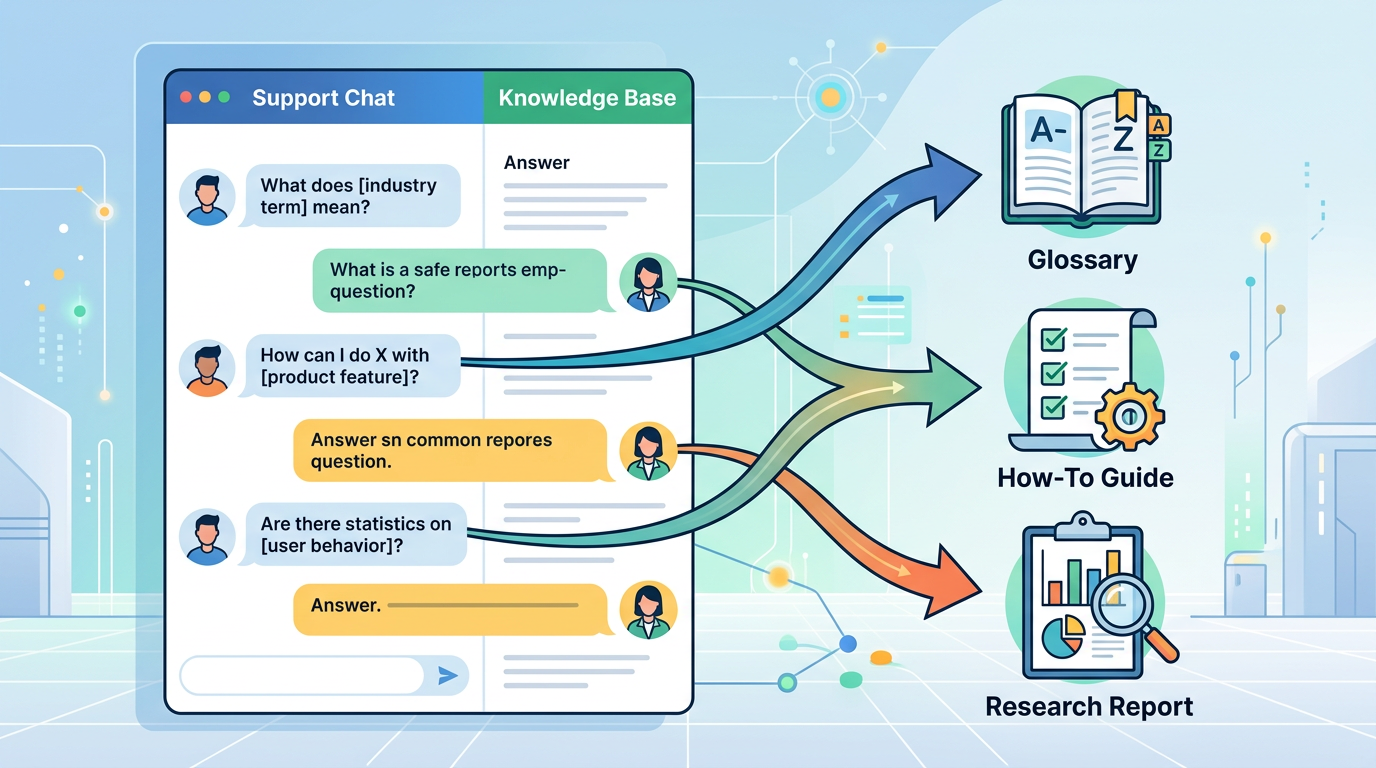
Your support team answers the same dozen questions every week. Your knowledge base sits on a subdomain collecting dust. Meanwhile, your competitors are earning backlinks to glossaries, research reports, and how-to guides that answer the exact same questions, because they figured out how to package support data as reference content.
The gap between a FAQ page and a tailored linkable assets in seo is not creativity. It is process. Most businesses already own the raw material for high-authority resources; they just have not systematized the extraction, clustering, and production workflow that turns support tickets into assets other sites want to cite.
As of May 2026, the most effective white hat backlink strategies start with user intent, not outreach templates or guest-post pitches. When you build content around the questions real customers ask in real support conversations, you create resources that solve problems at scale. Other writers link to problem-solving resources because linking saves them from reinventing the explanation.
This article walks through a repeatable process for mining customer support and FAQ data, identifying high-demand informational topics, and transforming those topics into comprehensive guides, visual assets, and research summaries that earn backlinks without paid placements or link schemes.
Why Customer Support Data Is the Highest-Signal Source for Linkable Content
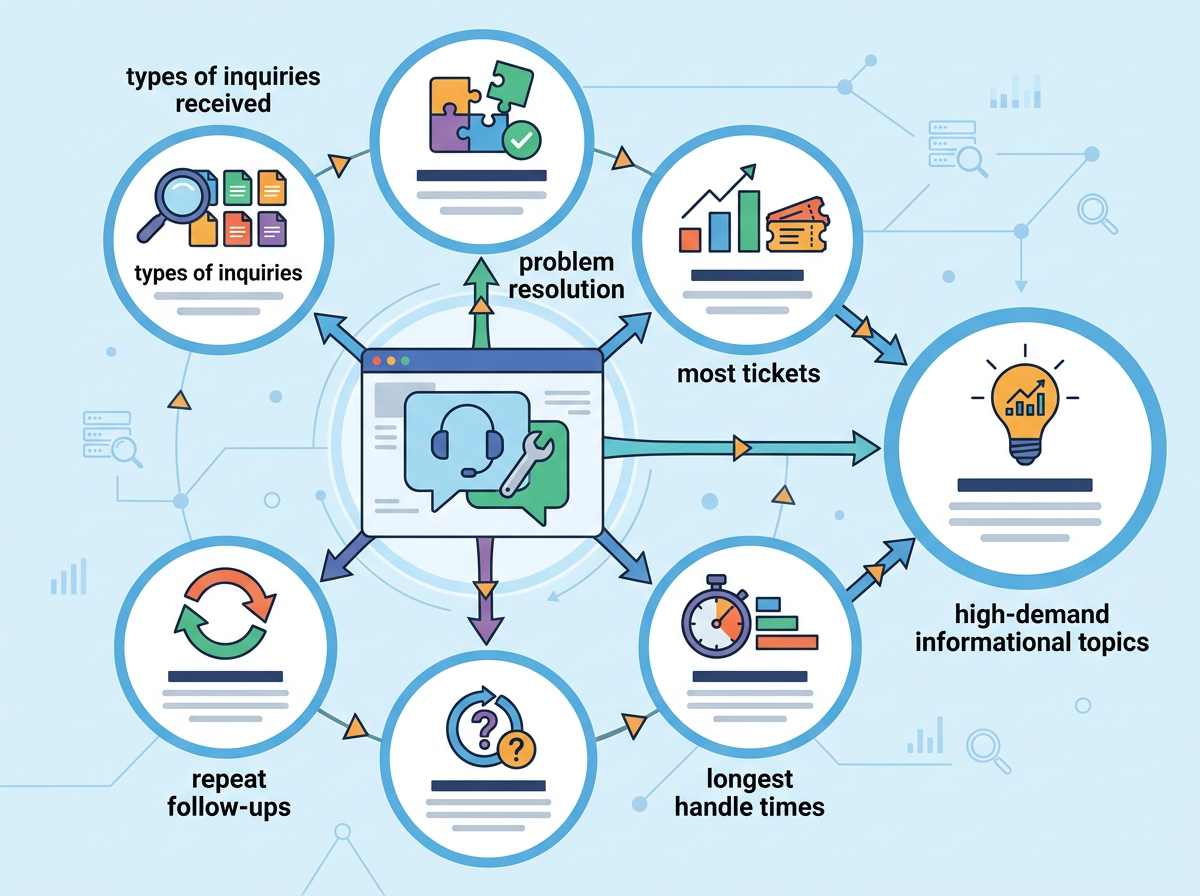
Customer service interactions capture the exact language people use when they hit a wall. According to the U.S. Office of Personnel Management's contact center management guidance, support teams routinely track "types of inquiries received" and "problem resolution" to understand customer needs and improve service delivery. That same tracking data reveals recurring information gaps, topics where existing web content falls short and users turn to live support for answers.
The questions that generate the most tickets, longest handle times, or repeat follow-ups are not edge cases. They are high-demand informational topics with proven search and support volume. When you turn those questions into structured, in-depth resources, you are not guessing at what might be useful. You are building exactly what a segment of your audience has already demonstrated they need.
Zendesk's Customer Experience Trends research notes that most customers want to resolve as many issues as possible on their own, and that high-performing companies are more likely to offer robust self-service options including FAQs and knowledge bases. The implication: if customers are asking your support team for an answer, many more are searching Google for the same answer and not finding a satisfactory result. Fill that gap with a comprehensive guide, and you create a resource other sites will reference when they write about the same topic.
Collect and Centralize Support Data Across All Channels
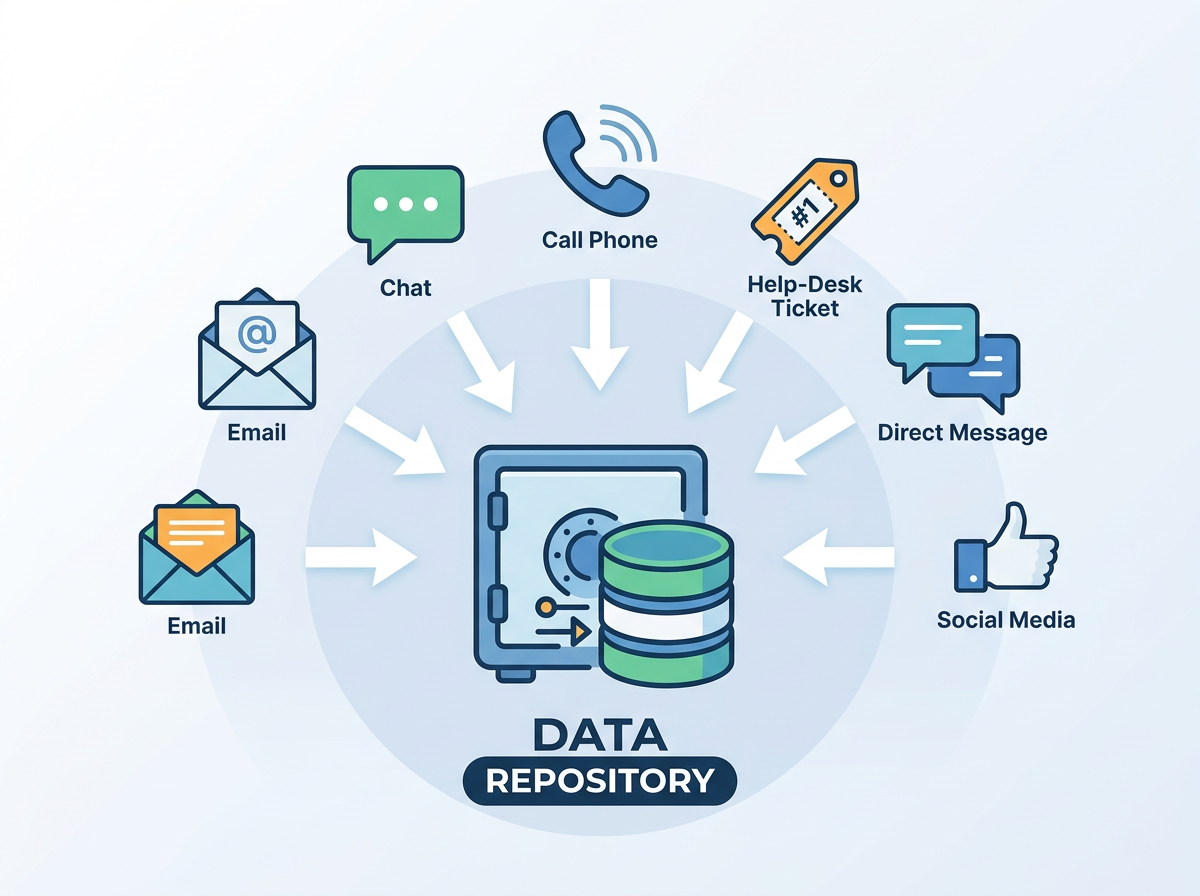
Before you can analyze patterns, you need a single repository of customer questions. Most support operations fragment data across email inboxes, chat transcripts, phone logs, and help-desk tickets. The U.S. General Services Administration's customer feedback guidance recommends collecting and analyzing feedback from call centers, email, and online channels to identify trends and inform content improvements. Apply that same cross-channel aggregation to your FAQ mining workflow.
Start by exporting ticket data from your help-desk platform, whether that is Zendesk, Freshdesk, HubSpot Service Hub, Intercom, Salesforce Service Cloud, Gorgias, Zoho Desk, or another system. Most platforms allow CSV or API export of ticket subject lines, full conversation threads, tags, and resolution notes. Pull at least six months of data to capture seasonal variations and product-launch spikes.
Next, gather questions submitted through on-site search, contact forms, and live chat. Google Analytics site-search reports show the terms users type into your internal search box, often revealing queries where existing content is hard to find or nonexistent. The U.S. General Services Administration's Digital.gov guidance on FAQs explains that agencies collect questions from call centers, email, and feedback channels, and that these FAQs often reveal missing or hard-to-find information on a site. The same logic applies to commercial knowledge bases: if users are searching your site for a term and not finding a satisfactory page, that term is a content-gap signal.
Centralize all question data in a spreadsheet or qualitative analysis tool. Each row should capture the original question text, the channel it came from, any tags or categories your team assigned, and the resolution or answer provided. This raw dataset becomes the input for thematic clustering.
Identify High-Demand Topics from Support Logs
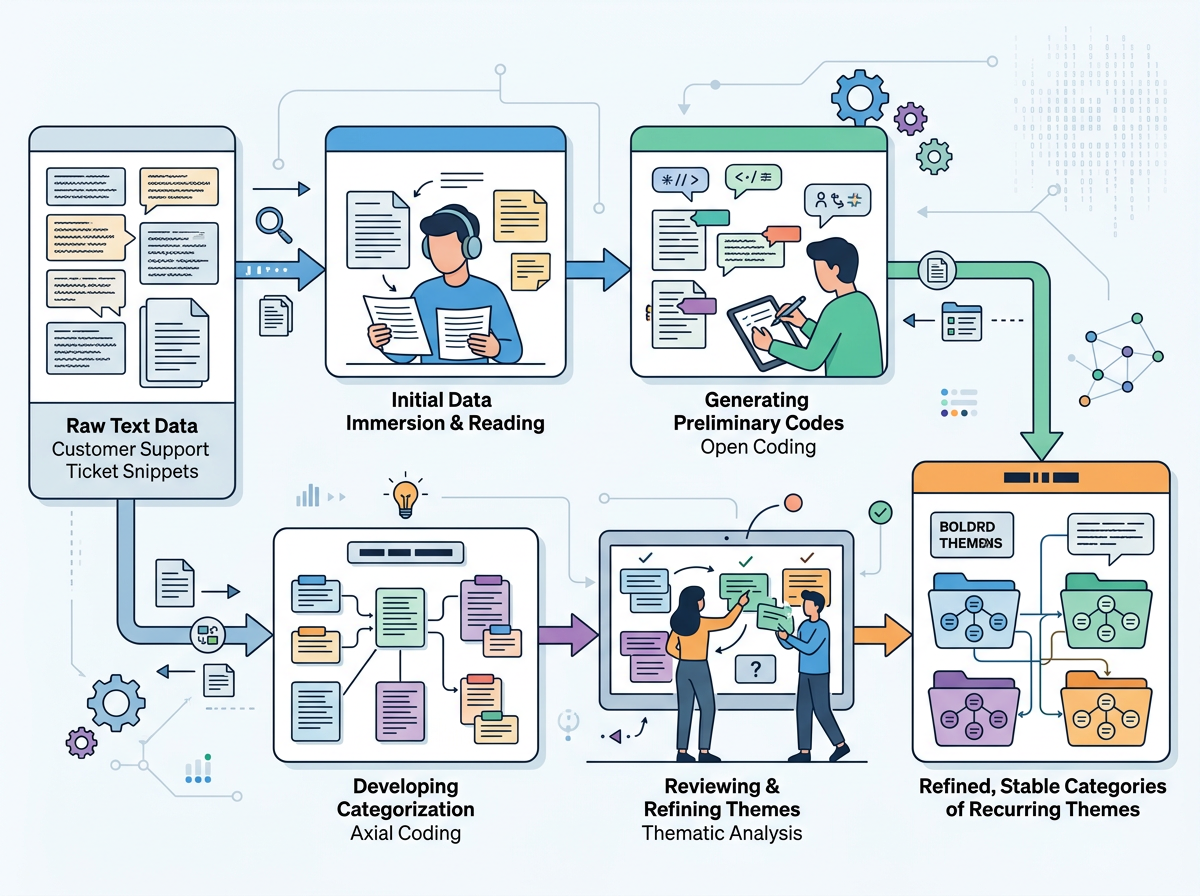
Once you have a consolidated dataset, the next step is pattern recognition. The University of Nebraska-Lincoln's social research methods guidance describes qualitative coding and thematic analysis as processes where researchers categorize text data to identify recurring themes. Apply that same method to your support questions: read through a sample of tickets, assign preliminary topic codes, and refine those codes into a stable set of categories.
Start by scanning the first 100-200 ticket subject lines or question snippets. Look for clusters of questions that use similar language or address the same underlying problem. For example, if you run a SaaS platform, you might see recurring questions about account setup, billing cycles, integration with third-party tools, data export formats, and user permissions. Each cluster represents a potential content topic.
As you code, track frequency. A topic that appears in five tickets over six months is interesting but low priority. A topic that appears in 150 tickets, generates follow-up questions, or correlates with high handle time is a prime candidate for a comprehensive guide. ServiceNow's knowledge management best practices recommend analyzing incident and case data to identify knowledge gaps, stating that teams should "look at incident trends to identify common issues and create articles that address them." The same trend analysis applies when building external-facing reference content: high-ticket-volume topics have proven demand and are more likely to attract backlinks because other writers encounter the same questions from their own audiences.
For readers new to systematic link building, the beginner's link building guide offers a framework for prioritizing topics based on search volume, competitive landscape, and backlink potential. Pair that strategic lens with your support data, and you can rank topics not just by internal ticket count but by external link-earning opportunity.
Transform FAQ Clusters into Comprehensive Guides
A single FAQ entry answers one question in 50-100 words. A linkable guide answers the cluster of related questions in 1,500-3,000 words, with structure, examples, and context that make it reference-worthy. HubSpot's knowledge base documentation recommends that companies "look at the most frequently asked questions your support team receives" and convert them into knowledge base articles to "empower customers to help themselves" and reduce ticket volume. Extend that advice one step further: instead of creating isolated KB articles, bundle related FAQs into a single pillar resource that other sites will link to when explaining the same topic.
For example, if your support data shows recurring questions about data export formats, API rate limits, and webhook configuration, do not write three separate FAQ entries. Write one comprehensive guide titled "Complete Guide to Data Export and API Integration" that covers file formats, rate-limit best practices, webhook setup, error handling, and troubleshooting. Structure the guide with descriptive H2 and H3 headings that mirror the questions customers ask. Google's SEO Starter Guide advises site owners to organize content logically, use descriptive headings, and make pages primarily for users. A well-structured FAQ-derived guide meets all three criteria: it groups related information, uses headings that reflect user queries, and prioritizes clarity over keyword density.
When drafting the guide, front-load the answer to the most common question. The U.S. Federal Plain Language Guidelines recommend placing the most important information at the beginning and using informative headings and short sections. Readers scanning your guide should be able to find the core answer in the first 200 words, then drill into specifics via subheadings. This structure also aligns with how Google evaluates helpful content: pages that answer the user's question quickly and clearly in the opening passage tend to rank higher for informational queries.
Add depth through examples, screenshots, step-by-step instructions, and troubleshooting tables. The Nielsen Norman Group's research on self-service UX states that users expect help content to include clear step-by-step instructions, troubleshooting guidance, and examples, and that users are frustrated by vague FAQs that lack detail. A guide that walks through each step, anticipates common errors, and provides visual confirmation (even simple annotated screenshots) becomes a resource other writers bookmark and cite when they need to explain the same process to their own readers.
For additional inspiration and proof points, browse the linkable asset articles archive to see how other teams have turned internal knowledge into external reference content.
Use Structured Data to Amplify FAQ Visibility
Once you have published a comprehensive guide built from FAQ clusters, enhance its discoverability with structured data markup. Google's documentation on FAQPage structured data explains that pages with a list of questions and answers can use FAQ schema, which may qualify the content for rich result features in Google Search. Implementing FAQ markup signals to search engines that your page directly answers common questions, increasing the likelihood that it appears in featured snippets, People Also Ask boxes, and other prominent search placements.
To add FAQ structured data, wrap each question-and-answer pair in JSON-LD markup and include it in the page's <head> or <body>. The markup should include the question text exactly as users ask it and a concise answer (typically 100-300 words). Google's guidelines specify that FAQ markup is appropriate for pages that present a list of questions with answers, where each answer is provided by the page publisher (not user-generated content or a forum thread).
Structured data does not guarantee rich results, but it improves your odds. More importantly, it forces you to write clear, standalone answers, answers that are useful even when extracted from the full guide and displayed in a search snippet. That clarity makes your content more cite-worthy: when another writer is drafting an article and needs a quick, authoritative answer to a sub-question, a well-marked FAQ block is easy to reference and link.
Package Support Insights as Visual Assets and Research Summaries
Not every FAQ cluster translates into a long-form guide. Some clusters are better served by visual formats: comparison tables, decision trees, process diagrams, or data visualizations. Moz's guide to link building notes that "reference content" including glossaries, comprehensive FAQ sections, and detailed guides often earn links because other writers refer to them to support or explain points in their own content. Visual assets earn links for the same reason, but with an added advantage: they are easier to embed, share, and screenshot.
If your support data reveals that customers frequently compare two product tiers, pricing models, or configuration options, build a side-by-side comparison table or matrix. Export it as a high-resolution image with your brand watermark, and publish it alongside a text explanation on a dedicated landing page. Other sites writing buyer guides or comparison posts will embed your table (with attribution and a backlink) rather than recreate the research themselves.
If customers ask sequential troubleshooting questions ("I tried X, it didn't work, what next?"), map the logic as a decision-tree flowchart. Tools like Lucidchart, Figma, or even Google Drawings can produce clean, shareable diagrams. Publish the flowchart on a page titled "Troubleshooting [Problem]: Step-by-Step Decision Tree" and include a text version of each decision point for accessibility and SEO. The visual becomes the link magnet; the text ensures the page ranks.
For quantitative support data, such as the percentage of tickets related to a specific issue, average resolution time by topic, or seasonal spikes in certain question types, consider publishing an annual or quarterly research summary. Statista, Pew Research Center, and other research organizations earn thousands of backlinks by publishing original data in accessible formats. You can apply the same model on a smaller scale: aggregate your support metrics, identify noteworthy trends, and publish a short report with charts and key findings. Frame it as "State of [Industry] Customer Support: What 10,000 Tickets Taught Us About [Topic]" and promote it to industry blogs, newsletters, and journalists who cover your sector.
Organize FAQ Content into Topic Hubs and Internal Link Clusters
A single comprehensive guide is valuable. A network of interlinked guides organized around a central topic hub is exponentially more valuable, for users, for search engines, and for backlink acquisition. The Nielsen Norman Group's guidelines on FAQ usability recommend grouping FAQs into logical categories and linking related questions together, noting that large undifferentiated FAQ lists are hard to use and that organizing questions by topic improves navigation and comprehension.
Apply that same information-architecture principle to your linkable assets. Identify a broad topic area that encompasses multiple FAQ clusters, for example, "API Integration," "Account Security," or "Billing and Payments." Create a pillar page that introduces the topic, outlines the most common questions, and links to individual deep-dive guides for each sub-topic. Each deep-dive guide should link back to the pillar and cross-link to related guides where relevant.
This hub-and-spoke structure accomplishes three goals. First, it improves user navigation: a visitor landing on one guide can easily discover related resources without returning to your homepage or site search. Second, it distributes link equity: when an external site links to one of your guides, the internal links pass authority to the pillar and related pages. Third, it signals topical authority to search engines: a cluster of interlinked, in-depth pages on a single topic demonstrates expertise and comprehensive coverage, which Google's helpful-content systems reward.
Google's general documentation on how Search works explains that many queries are informational and that Google aims to return pages that "provide a complete and authoritative answer" to users' questions. A well-organized topic hub increases the likelihood that one of your pages is selected as that authoritative answer, and once one page in the cluster ranks and earns backlinks, the internal link structure helps lift the others.
Promote FAQ-Derived Assets Through Ethical Outreach
Publishing a comprehensive guide is half the work. The other half is making sure the people who would benefit from linking to it actually see it. White hat link building relies on outreach that adds value to the recipient, not mass email templates or paid placements.
Start by identifying sites that have already written about the topic your guide covers. Use Google search operators (e.g., intitle:"[topic]" -site:yourdomain.com) or backlink analysis tools like Ahrefs, Moz, Majestic SEO, or Semrush to find articles that rank for related keywords or have linked to similar resources. Read those articles and look for gaps, outdated information, or sections where your guide would add context or a more complete answer.
Craft personalized outreach emails that reference the specific article, explain what your guide adds, and suggest where a link would improve the reader's experience. For example: "I noticed your article on [topic] covers [subtopic A] but doesn't go into [subtopic B]. We just published a comprehensive guide that walks through [subtopic B] with step-by-step examples and troubleshooting tips, thought it might be a useful addition to your resources section." Keep the email short, specific, and focused on the reader's audience, not your SEO goals.
Forrester's research on knowledge management for customer service notes that a "single source of truth" knowledge base improves consistency and reduces handle time because agents and customers access the same up-to-date information. The same principle applies to external reference content: when you position your guide as the definitive resource on a topic, other writers are more likely to link to it because it saves them from having to verify facts across multiple sources.
Avoid link exchanges, paid backlinks, or any tactic that violates Google's spam policies. The entire value proposition of FAQ-derived assets is that they earn links naturally because they solve real problems. Shortcuts undermine that value and risk penalties that erase months of content work.
Measure Impact and Iterate on High-Performing Topics
Once your FAQ-derived guides are live and promoted, track which topics earn backlinks, rank for target keywords, and reduce support ticket volume. Google Search Console shows which queries drive impressions and clicks to each page; compare that data to your original support ticket frequency to validate that high-ticket topics also have high search demand.
Use Bing Webmaster Tools, Ahrefs, Moz, or Semrush to monitor new backlinks. When a guide earns its first few links, analyze the linking pages: what angle did they take, what section of your guide did they reference, and what additional context could you add to make the guide even more cite-worthy? Iterate on high-performing content by expanding sections that get linked most often, adding new examples as customer questions evolve, and updating data or screenshots to keep the guide current.
Track support ticket trends over time. HubSpot's knowledge base documentation recommends using KB articles to "empower customers to help themselves" and reduce ticket volume. If a comprehensive guide successfully answers a cluster of FAQs, you should see a measurable drop in tickets on that topic. That reduction is both a cost saving (lower support load) and a signal that the content is working as intended. When support volume drops and backlinks increase, you have validated the full loop: customer questions → linkable asset → earned backlinks → reduced support burden.
Use Google Analytics to measure engagement on FAQ-derived guides: time on page, scroll depth, and internal click-through to related resources. Pages with high engagement and low bounce rates signal to search engines that the content satisfies user intent, which improves rankings and makes the page more discoverable to potential linkers.
Why This Process Works When Generic Content Fails
Most linkable-asset strategies start with keyword research or competitor gap analysis, tools that identify what other sites rank for, not what real users struggle with. FAQ-derived content starts with the opposite end of the funnel: the moment a customer hits a problem severe enough to contact support. That moment is higher-signal than any keyword-volume estimate because it represents demonstrated need, not projected search behavior.
The United Kingdom Government Digital Service content design guidance states that teams should "start with user needs" and that content should be based on the tasks users are trying to complete and the questions they ask. It recommends collecting evidence from support channels such as call centers and user research and then writing content that answers those questions clearly. Commercial content teams can apply the same user-centered design process: collect real questions, cluster them by theme, and publish comprehensive answers that other sites will cite when they need to explain the same topic.
When you build assets this way, you are not guessing at what might earn links. You are solving problems at scale, using language your audience already uses, and filling gaps that existing content has left open. That combination, proven demand, clear language, and genuine utility, is what makes an asset linkable.
Next Steps: Turn Your Support Data into a Link-Earning Engine
If you have been running a support team for more than six months, you already own the raw material for a dozen high-authority guides. The process outlined here, centralize data, cluster by theme, transform into comprehensive resources, enhance with structured data, package as visuals, organize into hubs, and promote through ethical outreach, is repeatable across industries, product categories, and service models.
Start small. Pick one high-ticket-volume topic from your support logs, draft a 2,000-word guide that answers every related question, publish it with FAQ structured data, and reach out to five sites that have written about the topic in the past year. Measure backlinks, rankings, and ticket reduction over 90 days. If the first asset performs, systematize the workflow and scale to the next cluster.
For teams that recognize the value but lack internal bandwidth or link-building expertise, visit our site specializes in transforming customer insights into white hat backlink opportunities. We work with businesses nationwide to audit support data, identify linkable topics, produce research-backed guides and visual assets, and execute ethical outreach that earns links from authoritative sites, no paid placements, no link schemes, no shortcuts that risk penalties.
Ready to turn your FAQ backlog into a backlink engine? Get a free quote and we will walk you through a custom roadmap based on your support data, competitive landscape, and link-building goals.
Further reading: Contact Center Management – A Guide for Government Managers.